
Spotlight Distribution
The Spotlight Distribution node can be used with an Octane Arealight or as part of an emission material on a polygon to create a realistic spotlight behavior. Note that the Octane Spotlight, discussed here, approximates an "out of the box" spotlight effect, with a preset scattering volume and does not use the Spotlight Distribution node.

In both the Texture Emission and Blackbody Emission nodes is a distribution slot, which is used to control the pattern of the emitted light. This can be set to a Grayscale or RGB image to load an Image Texture or an [IES ](javascript:void(0);.md)file. The Spotlight Distribution node is added to the Distribution slot in the Emission Node or the Octane Light tag (discussed here) applied to a suitable area light.

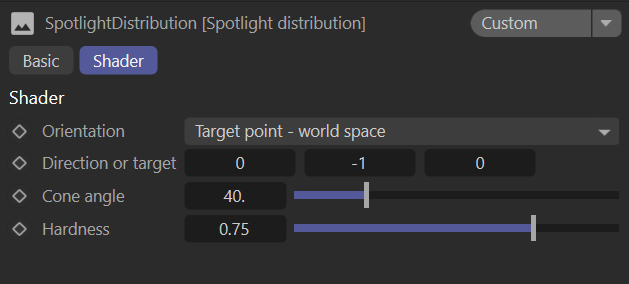
spotlight distribution node
The Spotlight Distribution Node consists of four controls:
Orientation — Determines where/how the spotlight will be pointed, based upon the following options:
Surface Normal — For flat emission objects, such as quads and Octane area lights, the direction of the light will always be the same as the surface normal of the emitter.
Direction - world space — A direction in world space, overrides the emitter orientation. Best used for rounder surfaces.
Direction - object space — A direction in object space, overrides the emitter orientation. Best used for rounder surfaces.
Target point - world space — An actual point in world space; overrides the emitter orientation. A scene object can be used as a target with some XPresso.
Target point - object space — An actual point in object space, overrides the emitter orientation. A scene object can be used as a target with some XPresso.
Direction or Target — The direction of the light or the target object.
Cone Angle — The angle of the actual cone. Smaller values produce a tighter cone.
Hardness — Sets the hardness of the penumbra (cone) boundaries. Lower values produce a softer look.