
Photon Tracing
The Photon Tracing kernel is designed to render caustics approximately 1000x faster and with less noise that the existing PMC kernel and using a novel GPU photon mapping and path guide approach. The Photon Tracing kernel produces more realistic imagery, considering how light interactions effect our perception of realism, than the Path Tracing kernel. The PMC kernel can be even more realistic, but at a significant time penalty required to resolve noise.

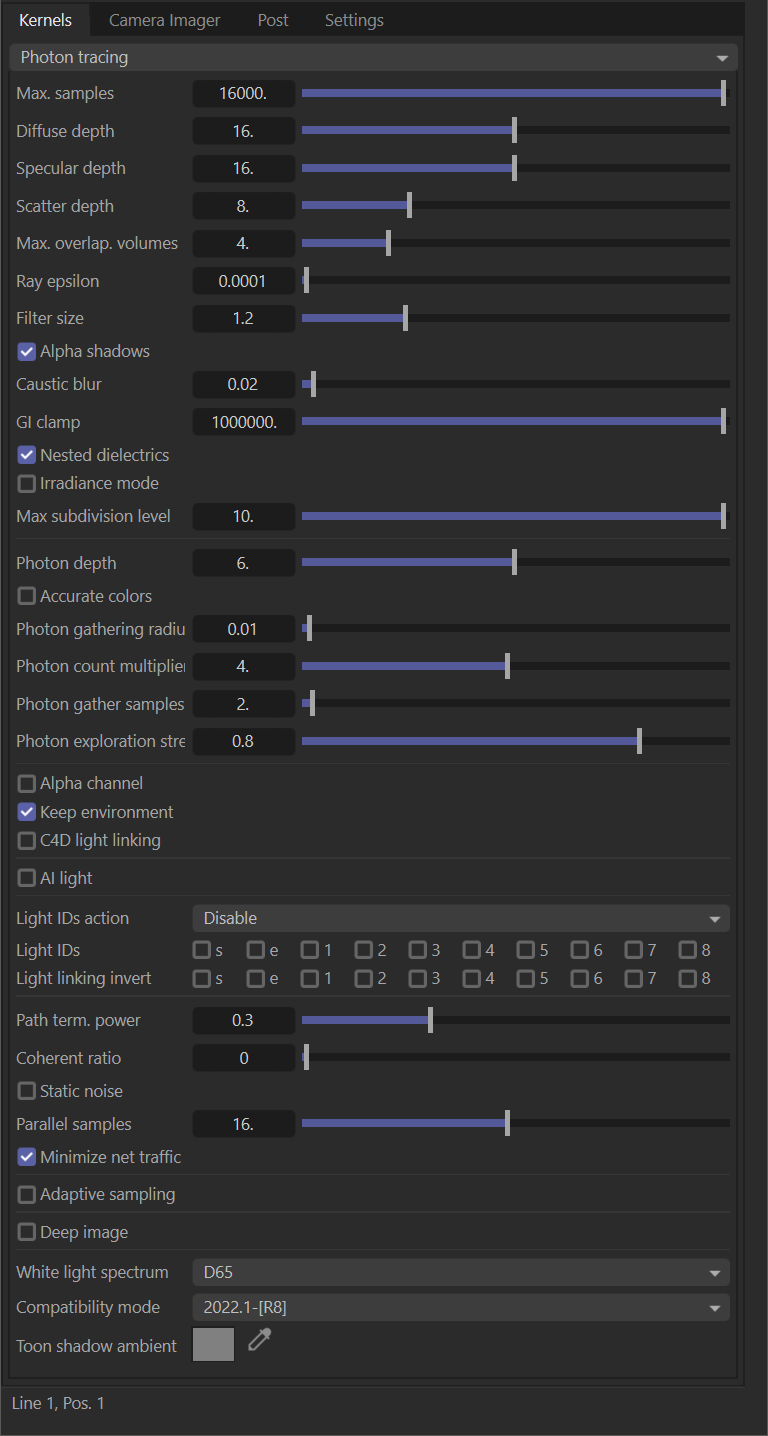
Render Kernel — photon Tracing
Max Samples
The number of samples per pixel that will be calculated before rendering is stopped.
Diffuse Depth
The maximum path depth for which diffuse reflections are allowed.
Specular Depth
The maximum path depth for which specular reflections/refractions are allowed.
Scatter Depth
The maximum path depth for which scattering is allowed.
Max Overlap Volumes
How much space to allocate for overlapping volumes. Ray marching is faster with low values but you can get artefacts where lots of volumes overlap.
Ray Epsilon
Shadow ray offset distance.
Filter Size
Film splatting width (to reduce aliasing).
Alpha Shadows
Enables direct light through opacity maps. If disabled, ray tracing will be faster but renders incorrect shadows for alpha-mapped geometry or specular materials with "fake shadows" enabled.
Caustic Blur
Caustic blur for noise reduction.
GI Clamp
GI clamp reducing fireflies.
Nested Dielectrics
Enables nested dielectrics. If disabled, the surface IORs not tracked and surface priorities are ignored.
Irradiance Mode
Render the first surface as a white diffuse material.
Max Subdivision Level
The maximum subdivision level that should be applied on the geometries in the scene. Setting zero will disable the subdivision.
Photon Depth
The maximum path depth for photons.
Accurate Colors
If enabled colors will be more accurate but noise will converge more slowly.
Photon Gathering Radius
The maximum radius where photons can contribute.
Photon Count Multiplier
Approximate ratio between photons and camera rays.
Photon Gather Samples
Maximal amount of photon gather samples per pixel between photon tracing passes. This is similar to max. tile samples, but it also affects the quality of caustics rendered. Higher values give more samples per second at the expense of caustic quality.
Photon Exploration Strength
The higher this value, the more the photon sampling is influenced by which photons are actually gathered.
Alpha Channel
Enables a compositing alpha channel.
Keep Environment
Keeps environment with enabled alpha channel.
C4D Light Linking
Enables the use of Cinema 4D's ability to Include or Exclude scene objects from the illumination of the light, via the Project tab in the Light Object Attribute Manager panel.
AI Light
Enables AI light.
AI Light Update
Enables dynamic AI light update.
Light IDs Action
The action to be taken on selected lights IDs.
Light IDs
Globally enable or disable light IDs. A combination of flags in the LightPassMask enum.
Light Linking Invert
Inverts the light linking behavior for selected light IDs. A combination of flags in the LightPassMask enum.
Path Term Power
Path may get terminated when ray power is less than this value
Coherent Ratio
Runs the kernel more coherently which makes it usually faster, but may require at least a few hundred samples/pixel to get rid of visible artifacts.
Static Noise
If enabled, the noise patterns are kept stable between frames
Parallel Samples
Specifies the number of samples that are run in parallel. A small number means less parallel samples and less memory usage, but potentially slower speed. A large number means more memory usage and potentially a higher speed.
Max Tile Samples
The maximum samples we calculate until we switch to a new tile.
Minimize Net Traffic
If enabled, the work is distributed to the network render nodes in such a way to minimize the amount of data that is sent to the network render master.
Adaptive Sampling
Stops rendering clean parts of the image and focuses on noisy parts.
Noise Threshold
A pixel treated as noisy pixel if noise level is higher than this threshold. Only valid if the adaptive sampling or the noise render pass is enabled
Adaptive Samples
Minimum number of samples per pixel until adaptive sampling kicks in. Set it to a higher value if you notice that the error estimate is incorrect and stops sampling pixels too early resulting in artifacts. Only valid if adaptive sampling is enabled.
Sampling Pixel Group
Size of the pixel groups that are evaluated together to decide whether sampling should stop or not.
Adaptive Sampling Exposure
The expected exposure should be approximately the same value as the exposure in the imager or 0 to ignore this settings.
It's used by adaptive sampling to determine which pixels are bright and which are dark, which obviously depends on the exposure setting in the imaging settings. Adaptive sampling tweaks/reduces the noise estimate of very dark areas of the image. It also increases the min. adaptive samples limit for very dark areas which tend to find paths to light sources only very irregularly and thus have a too optimistic noise estimate.
White Light Spectrum
Controls the appearance of colors produced by spectral emitters (e.g. daylight environment, black body emitters). This determines the spectrum that will produce white (before white balance) in the final image. Use D65 to adapt to a reasonable daylight "white" color. Use Legacy/flat to preserve the appearance of old projects (spectral emitters will appear rather blue).
Deep Image
Render a deep image.
Deep Enable Passes
Include render AOVs in deep pixels.
Depth Samples
Maximum number of depth samples per pixels.
Depth Tolerance
Depth samples whose relative depth difference falls below the tolerance value are merged together.
Toon Shadow Ambient
The ambient modifier of toon shadowing.
Compatibility Modes
New compatibility modes have been added to Octane that emulate older versions of Octane. Choose the mode that matches the creation of your scene.
2022.1-[R8] — Latest edition.
2021.1 compatibility mode — Volume tracing behavior from versions 2018.1 to 2021.1 is used.
2021.1 compatibility mode (with 4.0 volumes) — Volume tracing behavior from version 4.0 and earlier is used.
2018.1 compatibility mode — Volume tracing behavior from versions 2018.1 to 2021.1 is used. Original pipeline for converting colors to and from spectra and for applying white balance is used (textures with colors outside the sRGB gamut will be rendered inaccurately).
4.0 compatibility mode — Volume tracing behavior from version 4.0 and earlier is used. Original pipeline for converting colors to and from spectra and for applying white balance is used (textures with colors outside the sRGB gamut will be rendered inaccurately). .